 AuCut
Step by step
-
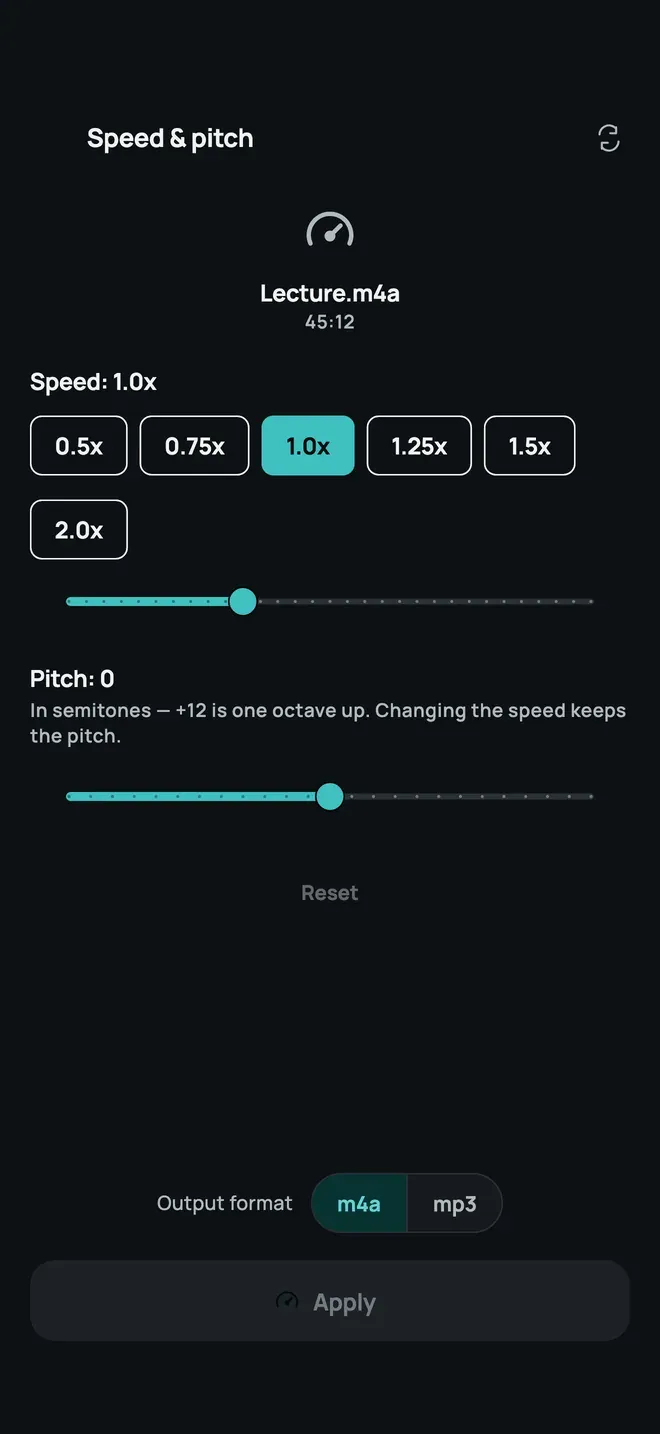
Open Speed & pitch and choose the file. On AuCut’s home screen, tap Speed & pitch and pick the audio.
-
Pick a speed. Tap a speed from 0.5x to 2.0x, or drag the slider. The label shows the speed, such as Speed: 1.0x.
-
Change the pitch if you want to. The Pitch slider works in semitones: +12 is one octave up. Changing the speed keeps the pitch, and Reset puts both back.
-
Choose the format and tap Apply. Pick m4a or mp3, then Apply. Preview, then share or save.
Uses
- Slow a lecture or a language recording to hear every word.
- Speed up a long recording to get through it quicker.
- Match the key of a track by shifting the pitch alone.
Other ways to do it
- Player apps can change playback speed while you listen, but they don’t save a new file.
- Desktop editors do time-stretching, but need a computer.
Questions people ask
Does slowing audio down make the voice deeper?
Not in AuCut. Changing the speed keeps the pitch, so a slowed voice still sounds like the same voice. The pitch changes only if you move the Pitch slider.
How do I change the pitch alone?
Use the Pitch slider, which works in semitones: +12 is one octave up. Leave the speed at 1.0x, and only the pitch changes.

Get AuCut
Cut audio and extract it from video


On the App Store as “AuCut: Audio Cutter & Editor”. On Google Play as “adTrim: Offline Audio Tools”.