 AuCut
Step by step
-
Open Split and choose the file. On AuCut’s home screen, tap Split and pick the audio, or share a recording to AuCut from another app.
-
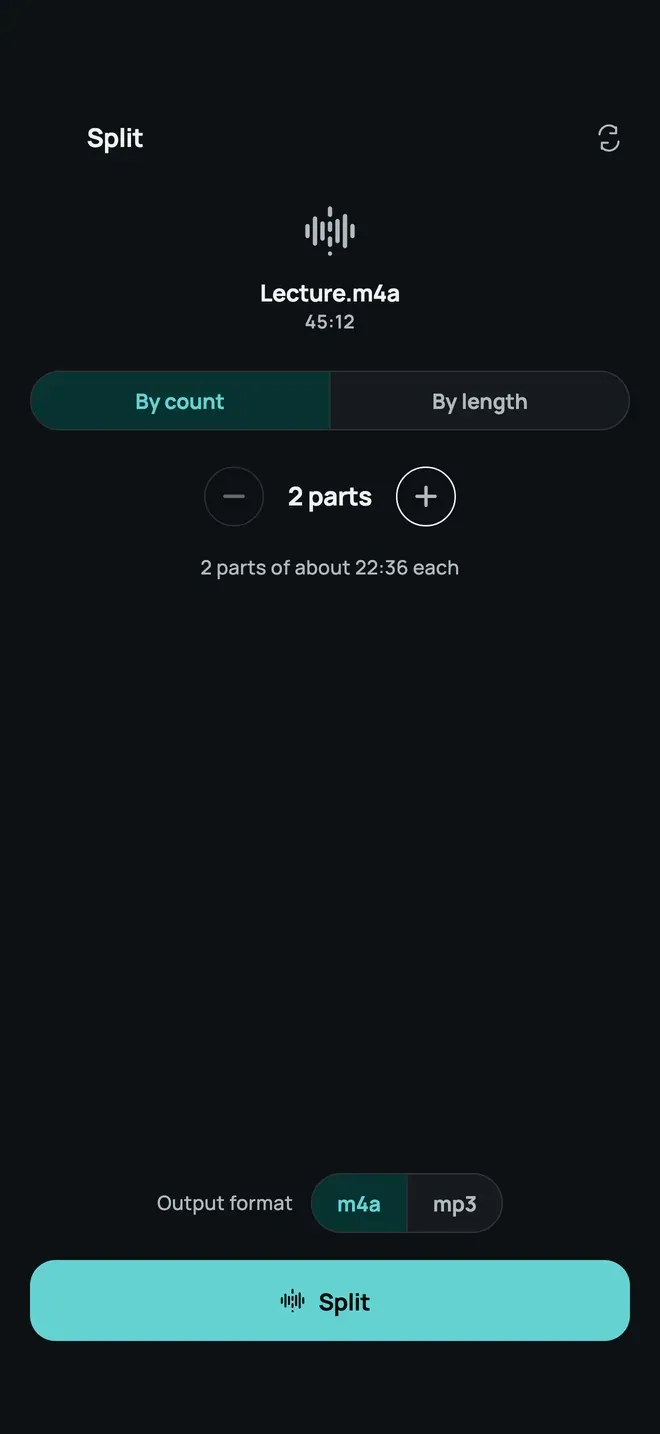
Choose how to split it. Under By count, tap + or − to set the number of parts: the line below shows how long each one is, for example “2 parts of about 22:36 each”. Switch to By length to set the length of each part instead.
-
Pick the format and tap Split. Choose m4a or mp3, then Split. AuCut cuts the file on your phone. Share or save each part.
Good for
- A long lecture or podcast cut into chapters.
- A voice recording divided into parts you can send one at a time.
- A file too big to send split into shorter ones.
To keep only a section instead, use trim. To join parts back, merge them.
Other ways to do it
- Desktop editors can split at markers, but need a computer.
- Online splitters upload the whole file first.
Questions people ask
Can I split by length instead of by number of parts?
Yes. Switch from By count to By length and set how long each part should be. AuCut shows how many parts that gives.
Where do the parts go?
AuCut keeps each part as its own file. Share one to another app or save it to Files, and do the same with the rest.

Get AuCut
Cut audio and extract it from video


On the App Store as “AuCut: Audio Cutter & Editor”. On Google Play as “adTrim: Offline Audio Tools”.